Free plugin for ChatGPT · Built for trade crews

Your notes in.
A PDF out.

Tell ChatGPT about the job. JobPaper turns it into a clean, professional estimate, change order, or job report — with your name, your numbers, and the math done right. Tap to fix anything, then send the PDF.

  • No account to make
  • Works on your phone
  • PDF in under a minute
RemodelPlumbingElectricalRoofingPaintingFence & deckDrywallTile & flooringHVACLandscapingConcreteHandyman

How it works

Three taps from the truck to the customer.

  1. 1

    Say it like you’d text it

    “Put together a quote for a bathroom remodel — demo the tile, new floor, new vanity.” Snap photos for a daily report. ChatGPT drafts the lines in plain English.

  2. 2

    Tap anything to fix it

    The document opens looking exactly like the PDF. Change a price, a quantity, or a line. Totals, markup, and tax update instantly.

  3. 3

    Send the PDF

    Download a branded PDF with your logo and phone number, or copy a short text version to send by message.

Three documents

The paperwork that eats your evenings — done.

Estimate

Win the job before you leave the driveway.

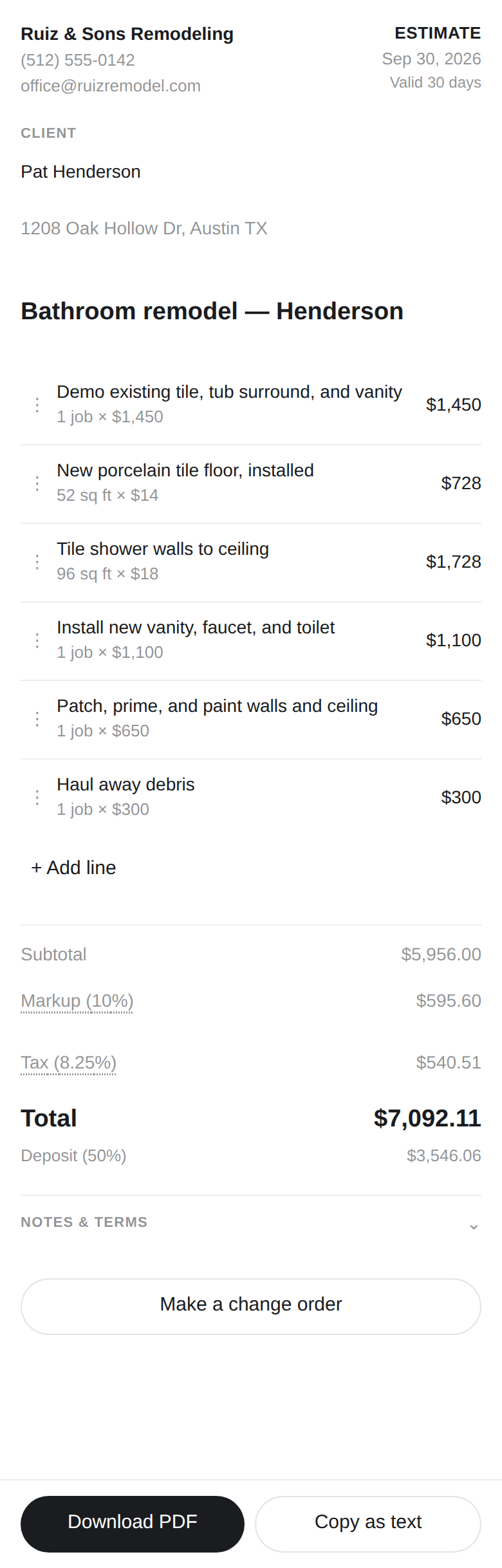
“Write up an estimate for…”, “bid for a…”, “price out a…” — and you get line items, subtotal, markup, tax, total, and the deposit, all calculated for you.

  • Your business name, phone, and logo on every page
  • Valid-for date and your payment terms
  • Customer approval line at the bottom
JobPaper estimate panel with six line items and a $7,092 total
Change order

“They want to add…” — without the argument later.

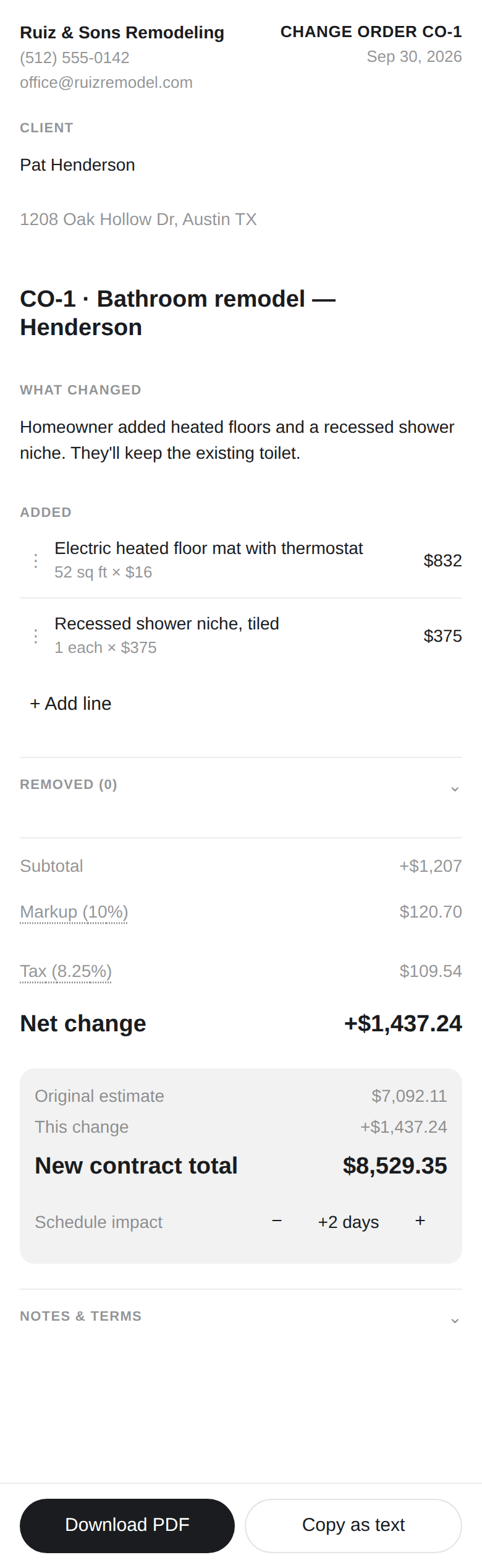
JobPaper reads the original estimate and shows exactly what changed: added work, removed work, the net change, the new contract total, and extra days.

  • Original total pulled from the estimate — never retyped
  • Numbered CO-1, CO-2… so nothing gets lost
  • One tap back to the original estimate
JobPaper change order showing a new contract total of $8,529
Job report

Keep the homeowner in the loop in two minutes.

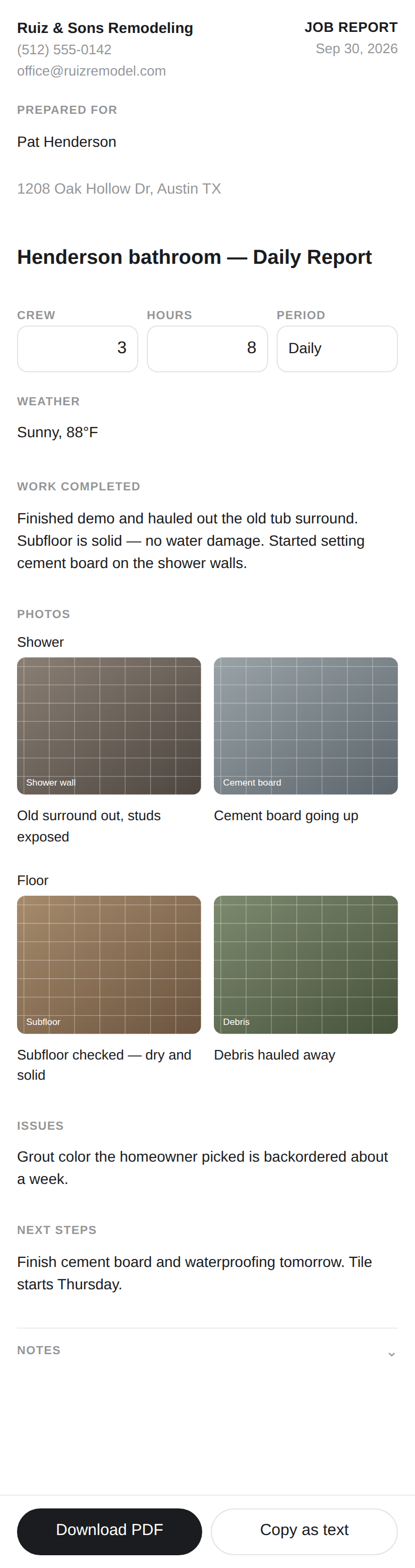
“End of day report for the Henderson job” plus your photos. Get a clean daily or weekly update with captions, crew and hours, issues, and next steps.

  • Photos two across, grouped by area
  • Issues and next steps called out at the end
  • Looks professional on any phone
JobPaper daily job report with a photo grid

Why crews use it

Looks like you have an office. You don’t need one.

The math is always right

Subtotal, markup, tax, and deposit are calculated for you — never guessed by the AI.

Your brand on every PDF

Set your business name, phone, logo, markup, tax, and terms once. Every document uses them.

Saved right in the chat

Every estimate is saved as a file in your ChatGPT conversation, so you can pull it up weeks later.

Copy as text

A short, clean version with the total, deposit, and your number — ready to paste into a text.

Built for thumbs

Big tap targets, number keypad for prices, works in bright sunlight on a phone.

Nothing to sign up for

No new app, no login, no monthly software bill. It lives inside the ChatGPT you already use.

Privacy

Your jobs stay yours.

Job details and photos are never stored on our servers — they’re used to build your document and that’s it.

PDFs are made on your phone. Documents are saved in your own ChatGPT chat.

We only keep your business settings (name, phone, logo, rates), and we never sell or share anything. Read the privacy policy.

Get started

Set up in two minutes.

  1. Open ChatGPT on your phone or computer.
  2. Go to Apps and search for JobPaper, then add it.
  3. Add your business name and phone in JobPaper’s settings — and your logo if you have one.
  4. Say: “Write up an estimate for…”

FAQ

Questions

Is JobPaper free?

Yes. Estimates, change orders, job reports, PDFs, and saved settings are all free.

Do I need an account?

No. If you have ChatGPT, you have everything you need.

Where are my documents saved?

As small files in your ChatGPT conversation (.est.json, .co.json, .rpt.json), so you can reopen them and make a change order later. PDFs download straight to your phone or computer.

Can I change the prices it suggests?

Always. Tap any line to change the description, quantity, unit, or price. Totals update right away.

Does it do invoices or scheduling?

Not right now. JobPaper does estimates, change orders, and job reports — and does them well.

Are the payment terms legal advice?

No. The terms are an editable sample — change them to match how you do business and what’s required where you work.

Need help?

Email support@jobpaperapp.com — we answer within one business day.

Stop doing paperwork at the kitchen table.

Get JobPaper — free